
Complete – Medication Tracker
AbbVieMedical
3.61.17K Reviews
- Version
- 19.5
- Installs
- 100.00K
- Age Rating
- Everyone
Screenshots
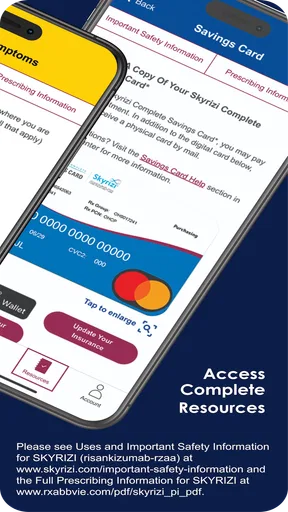
Our Review of Complete – Medication Tracker
 Analysis by Appyee
Managing a prescription is rarely difficult because of one complicated task. The real problem is the chain of small tasks around it: remembering whether a dose was taken, checking instructions, keeping treatment information nearby, and knowing what to do when a routine changes. Complete – Medication Tracker is a free medical app from AbbVie that focuses on that everyday organization. I found it most useful as a simple companion for people who want a clearer medication routine, not as a replacement for a doctor, pharmacist, or emergency service.
The app is aimed at an Everyone audience, and its store summary points users toward indications and important safety information, including a boxed warning. That matters because this is not just a generic reminder tool. The information it presents should be read carefully and matched to your own treatment instructions. My overall impression is that Complete works best when I treat it as a structured reference and tracking aid: I set it up deliberately, use it consistently, and avoid expecting it to make medical decisions for me.
How the everyday medication routine works
The most sensible way to begin is to build the app around the treatment as it has actually been prescribed. I would keep the medication packaging or written instructions beside me during setup, rather than relying on memory. That small habit reduces the chance of entering an incorrect schedule, especially when a medicine has particular timing, preparation, or safety instructions.
Once the basic treatment information is in place, the value of a tracker comes from repetition. I would open Complete at the same point in my routine each day, such as after brushing my teeth or preparing breakfast. The goal is not to spend time inside the app; it is to create one dependable check-in that answers a practical question: have I recorded what happened with this dose?
A realistic example is a busy weekday morning. I may be preparing for work, dealing with a child, and trying to leave on time. A medication tracker can give that moment a defined place in the routine instead of leaving the answer to memory later. If I cannot remember whether I took the medicine, I would not guess or take an extra dose. I would check the instructions and contact a healthcare professional when necessary. The app can help me record and review information, but it cannot safely resolve every missed-dose situation.
That distinction is especially important with treatments that have strict instructions or prominent safety warnings. Complete should support a plan supplied by a qualified professional. It should not be used to change the amount, timing, or duration of treatment simply because a reminder feels inconvenient. I see the app as a way to make adherence easier to observe, not as an authority that interprets symptoms or replaces clinical advice.
The app can also be useful when another person helps with medication management. A family member may need a quick view of whether a routine was recorded, while the person taking the medicine still makes the health decisions with their care team. In that situation, clear and consistent entries are more valuable than detailed notes written only occasionally. I would agree in advance on who checks the record and when, rather than turning the app into a source of constant supervision.
One of the less obvious benefits of this workflow is that it exposes uncertainty. If I repeatedly hesitate before marking a dose, that may indicate that the routine itself is poorly placed, the instructions are confusing, or the medication is being stored somewhere inconvenient. The answer is not always “try harder to remember.” Moving the physical medicine, clarifying the instructions with a pharmacist, or attaching the app check to a stronger daily cue may solve the real problem.
What I would prepare before using it
I would first collect the exact medication name, the prescribed directions, and any safety material that came with it. I would then decide whether I am tracking one treatment or using the app as part of a broader personal routine. This prevents a common mistake: treating setup as a quick form-filling exercise and discovering later that the record does not match the actual prescription.
I would also choose a realistic review habit. Some users only need to confirm a dose at the moment it is taken. Others may benefit from looking back before an appointment, particularly if they often lose track of missed or delayed doses. A short review before speaking with a healthcare professional can make the conversation more precise, but I would still describe symptoms, side effects, and uncertainties directly rather than assuming the tracker tells the whole story.
The app is available at no charge, which makes it easy to try without committing to a subscription. It has been available since September 9, 2015, and its current version is 19.5. On Android, the listed minimum is version 6.0 of the operating system, so people with very old devices should check compatibility before planning their routine around it.
Settings and information worth checking carefully
The most important “setting” is accuracy. I would review every medication detail after entering it and compare the result with the prescription label. A reminder that is consistently wrong is worse than no reminder because it creates false confidence. This is where Complete demands more attention than a basic alarm: the user has to understand what is being recorded and make sure it reflects the treatment plan.
I would also read the app’s indications and important safety information instead of skipping past it. The boxed warning deserves particular attention. Medical warnings are not decorative legal text; they can affect whether a treatment is appropriate and what risks need to be discussed. If I am unsure how a warning applies to me, I would ask a doctor or pharmacist rather than trying to interpret it through the app alone.
Another useful check is notification behavior on the phone itself. A medication tracker can only help if its reminders are allowed to appear and are not routinely silenced by the device. I would look at the phone’s notification controls, quiet modes, battery restrictions, and any setting that might hide alerts. I would not assume that installing the app automatically guarantees a visible reminder at the right moment.
At the same time, I would avoid making notifications so aggressive that I dismiss them without reading. A reminder should fit the real rhythm of the day. If I am usually commuting at a particular time, placing the check immediately before that period may be more useful than choosing an ideal time that I regularly miss. The best schedule is the one that matches the moment when the medication can actually be taken safely.
Privacy is another reason to be intentional. Medication information is sensitive, so I would consider who can see the phone screen, whether notification previews expose more detail than I want, and whether a shared device changes the way I use the app. These are not reasons to avoid tracking; they are reasons to keep the phone and the routine under sensible personal control.
Faster patterns for people who already have a routine
Experienced users usually gain more from consistency than from repeatedly exploring the interface. I would create a short sequence: open Complete, check the current medication task, record the result, and close the app. Keeping that sequence stable makes it easier to notice when something is unusual. If I start wandering through unrelated screens every time, the tracking task becomes slower and easier to postpone.
A useful shortcut is to connect the app check with an existing physical cue. For example, I might keep the medication in the same safe, appropriate place and use the moment of taking it as the trigger to record it immediately. The important point is that the app should follow the real medication action, not become a separate memory test several hours later.
For a changing schedule, I would pause before editing anything. Temporary changes, travel, illness, or a new prescription can make a previously reliable routine misleading. I would confirm the new instructions with the care team, update the app carefully, and then check the first few entries against the written plan. This two-step approach takes longer than casually changing a time, but it protects the record from silently drifting away from the prescription.
I would also use the tracker as preparation for conversations, not as a substitute for them. Before an appointment, I might review where I missed a dose, where I was uncertain, or where the routine conflicted with work or sleep. That gives me concrete examples to discuss. It is more useful than saying only that I am “sometimes inconsistent,” because the pattern may reveal a solvable timing problem.
One trade-off is that more tracking does not always mean better tracking. If recording every detail makes me abandon the routine after a few days, a simpler consistent record is preferable. Complete is most helpful when the amount of information matches what I can maintain. Someone who wants extensive symptom diaries, laboratory analysis, or broad health dashboards may find a larger health platform more suitable, while someone who only needs a basic alarm may prefer the phone’s built-in reminder.
Where the app reaches its limits
Complete is not the right choice for urgent medical concerns. It cannot examine me, judge an allergic reaction, confirm whether a symptom is dangerous, or replace emergency help. I would never wait for a tracker to answer a time-sensitive health question. The app’s safety information can encourage better awareness, but it does not turn the phone into a clinical service.
It is also not ideal for someone who wants a completely automatic experience. Medication management still depends on the user entering accurate information, responding to the routine, and correcting changes. If I do not know the prescribed directions, I cannot expect the app to infer them safely. That is a limitation shared by responsible medication tools: automation cannot compensate for uncertain clinical instructions.
People managing many unrelated prescriptions may also need to assess whether this focused experience covers their entire routine comfortably. A general medication manager could be better when the priority is coordinating a complex list across several clinicians, pharmacies, or treatment plans. Conversely, a focused app may feel less overwhelming for someone whose main need is to stay engaged with one particular therapy and its safety information.
The public response suggests a mixed but meaningful reception, with an average rating of 3.6 from around 2.2 thousand ratings and about 1.2 thousand written reviews. I would read that as a reason to approach it realistically: many people may find the core purpose useful, while others may encounter setup, notification, or workflow friction. Its reach is also substantial, with over one hundred thousand installs, but popularity alone does not determine whether the design fits a specific treatment routine.
Because AbbVie develops the app, I would pay attention to the scope of the medication information and how closely it relates to my own treatment. The app can be valuable for its intended context, yet users should not assume that a developer’s medical content replaces independent advice from their own healthcare professionals. That is especially important when a prescription, diagnosis, or personal risk factor differs from the situation described in the app.
My verdict after building a repeatable habit
After looking at Complete as a daily tool rather than a one-time download, I see its strongest quality in the structure it gives to an easily forgotten task. The app is free, focused on medical use, and suitable for an Everyone-rated audience, but its usefulness depends on careful setup and honest expectations. It rewards people who want to follow a treatment routine more deliberately and who are willing to read the safety material instead of treating the app as a simple alarm.
I would recommend it to someone who needs a dedicated medication-tracking companion, particularly when the treatment information and reminders are relevant to their situation. I would skip it in favor of a general health platform if I needed broad records across many kinds of care, and I would choose a basic alarm if all I wanted was a single daily prompt with no medication-specific context.
My practical advice is to start slowly: enter the treatment from the label, verify the details, read the indications and boxed warning, check the phone’s notification behavior, and attach the tracking action to a habit that already happens every day. After that, use the record to spot uncertainty and discuss it with a professional. The best result comes from treating Complete as a dependable routine aid, not as a medical decision-maker.
With that mindset, the app becomes more than a reminder that can be dismissed. It becomes a small checkpoint between the prescription and real life, helping me notice whether my routine is working and where it needs attention. That is a modest role, but for medication management, a modest tool used consistently can be more useful than a feature-heavy alternative that never becomes part of the day.
For readers deciding whether to try it, the answer is straightforward: Complete – Medication Tracker is worth considering when focused tracking and treatment-related guidance matter more than a full personal health suite. Just keep the clinical boundaries clear, verify every important instruction, and let your healthcare team—not the app—guide changes to medication.
Verdict
Strengths of Complete – Medication Tracker
- Tracks doses, schedules, and medication history in one place.
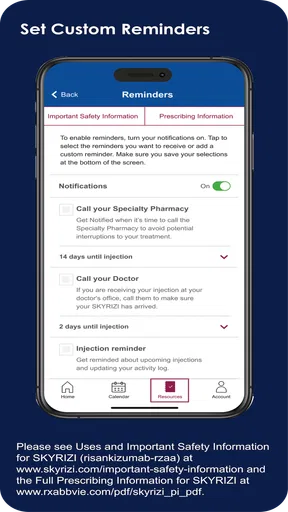
- Custom reminders can help reduce missed doses.
- Supports multiple medications and treatment plans.
- Useful for monitoring refill dates and remaining supplies.
- Simple logs can make doctor visits easier to prepare for.
Limitations of Complete – Medication Tracker
- Some features may require a subscription or in-app purchase.
- Reminder reliability depends on notification and battery settings.
- Manual entry can be time-consuming for large medication lists.
- It is not a substitute for medical advice or professional treatment.
- Data privacy policies should be checked before entering health details.
Other Releases by AbbVie
View All
Allē
Medical4.4
Similar Picks in This Category
View All
WebMD: Symptom Checker
WebMD, LLC4.1

Microphone Amplifier
DOSA Apps4.2

Anatomy Learning - 3D Anatomy
3D Medical OU4.5

Period Tracker and Calendar
SimpleInnovation4.9

GoodRx: Prescription Coupons
GoodRx4.8

CVS Health
CVS Pharmacy4.5
Frequently Asked Questions
What is Complete – Medication Tracker used for?
Complete – Medication Tracker is designed to help you organize and monitor your medications in one place. You can typically record prescriptions, supplements, dosage instructions, schedules, and treatment details, then use reminders to stay consistent. It may also help you review medication history and prepare useful information for appointments, although it should be treated as an organizational tool rather than a replacement for professional medical advice.
Can Complete – Medication Tracker remind me when to take my medicine?
Yes, medication reminders are one of the app’s main purposes. After adding a medicine, you can generally set the dosage, frequency, and preferred times so the app can notify you when it is time to take it. Reminder behavior may depend on your phone’s notification permissions, battery-saving settings, and whether the app is allowed to run in the background, so these settings should be checked carefully.
Can I track more than one medication or manage medications for my family?
The app is intended to support organized medication tracking, making it useful for people taking several prescriptions, vitamins, or supplements at different times of the day. Depending on the version and platform, it may also offer features for managing another person’s treatment routine. Before relying on it for a child, elderly relative, or caregiver situation, review the available profile and sharing options in the app.
Is my health and medication information private in Complete – Medication Tracker?
Medication records can contain sensitive personal health information, so privacy should be considered before entering details. Check the app’s privacy policy, permissions, account requirements, backup options, and any synchronization or sharing features before using it. Avoid assuming that information is completely private simply because the app is a tracker, and use a device lock and strong account security whenever available.
Can Complete – Medication Tracker replace advice from a doctor or pharmacist?
No. Complete – Medication Tracker can help you remember doses and keep treatment information organized, but it does not diagnose conditions, confirm whether a medicine is appropriate, or replace advice from a doctor or pharmacist. Never change a dosage, stop treatment, combine medications, or ignore possible side effects based only on an app reminder. Contact a qualified healthcare professional when you have concerns.
